Every "Sign in with Google" click creates an OAuth grant most people can't explain. Here's what's actually happening behind that button, and why it matters far beyond your SSO provider.

You've done it hundreds of times. A new app asks you to sign in, you see the familiar buttons—Sign in with Google, Sign in with Microsoft—you click one, approve a consent screen you didn't read, and you're in. Ten seconds, no new password.
That ten seconds is an OAuth grant. It's one of the most common security decisions made in any organization, and it's made almost entirely by people who have no idea what they just agreed to. That's not a knock on your workforce. The whole design goal of OAuth was to make delegation feel effortless. It worked.
But if you're responsible for security, "effortless" is exactly why you need to understand what's happening behind that button. So here's the 101.
When you click "Sign in with Google," you're not handing the new app your Google password. You're doing something more interesting: you're telling Google to vouch for you, and to hand the app a credential that lets it act as you—within limits you approve.
Those limits (called scopes) sit on a spectrum:
The consent screen for all three looks nearly identical. A checkbox list and an Allow button. Most people can't tell the difference between "confirm my identity" and "read and send my email forever," and the UI doesn't try very hard to help them.
Google and Microsoft make the useful teaching example because everyone has clicked those buttons. But if your mental model of OAuth grant management stops at those two ecosystems, you're looking at a fraction of the surface.
OAuth 2.0 was standardized in 2012, right as SaaS was eating enterprise software. In the decade and a half since, it has quietly become the default protocol for app-to-app data transfer. Slack connecting to your ticketing system. Your marketing platform syncing with your CRM. A CI tool with access to your GitHub repos. A scheduling app reading your calendar. An AI notetaker joining your meetings and filing summaries into your knowledge base. Every one of those is an OAuth grant with the same mechanics underneath—the "provider" just isn't Google. It's Salesforce, GitHub, Slack, Zoom, Notion, or any of the thousands of apps that expose an API.
The growth curve here is steep. Ten years ago, connecting two SaaS apps usually meant an API key pasted into a settings page by an admin. Today every meaningful SaaS product ships an integration marketplace, and OAuth is the currency those marketplaces run on. Across our customer base, Nudge Security has discovered more than 200,000 unique applications, and the average employee carries 88 OAuth connections. Not the average company—the average employee. AI assistants are accelerating this further, because an assistant is only useful once it's connected to your email, your files, and your chat, and OAuth is how those connections get made.
This is what we call the Workforce Edge—the sum of every connection decision your employees make on their own, app by app, without a procurement process or a security review. Each OAuth grant is one of those decisions. Multiply it by every employee and every app, and you get an attack surface that's less a fixed perimeter than a constantly shifting mesh of delegated trust.
So when we say "OAuth grant management," read it broadly. Google Workspace and Microsoft 365 are where the highest-value data tends to live, which makes them the right place to start. They're nowhere near the whole map.
Here's the part almost nobody understands, and it's the key to reasoning about OAuth risk. Every grant rests on two distinct trust relationships, established at different times, by different parties, with different secrets.
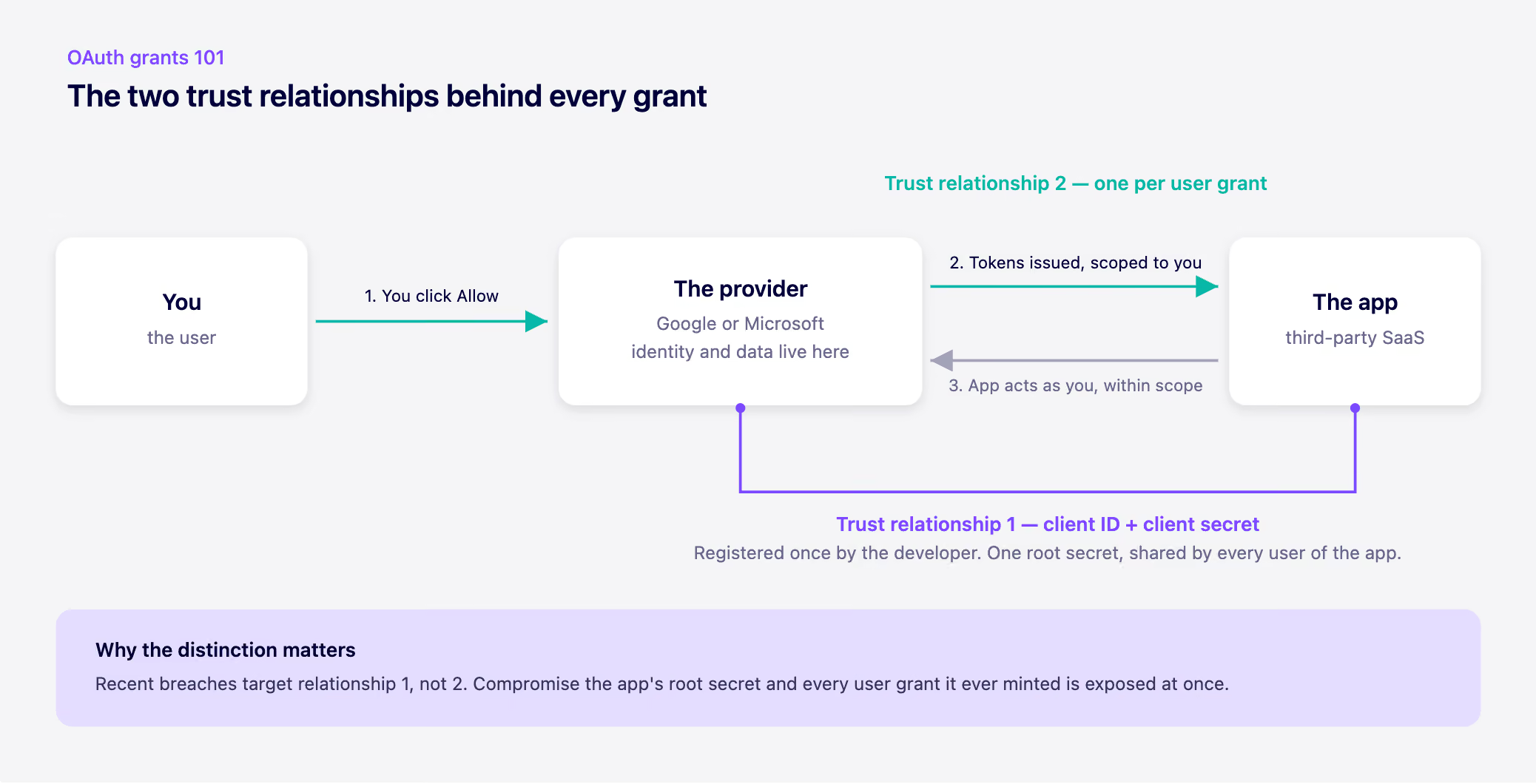
Trust relationship #1: the app and the provider. Long before any of your users touch the app, its developer registered an OAuth client with the provider. Google or Microsoft issued that client two things: a client ID (public) and a client secret (very much not public). That client secret is the root credential. Its entire job is to mint the user-specific secrets that come later. One client, one secret, shared across every user of that app, everywhere.
Trust relationship #2: the user and the app. This is the moment you click Allow. The provider takes your consent, and the app uses its client secret to exchange that consent for a new set of secrets—access and refresh tokens—scoped to you specifically. From then on, the app presents those tokens to act in your context. No password required, ever again.
So the chain looks like this: the root secret authenticates the app to the provider, and that root secret is what allows each user to delegate authority and spin up their own user-scoped secret. The user tokens are children of the client secret.
One more thing the 101 class needs to cover: how long these tokens live, how they're stored, whether they expire, whether they're rotated—none of that is up to you. It's determined by how the two apps implemented the OAuth protocol. Some refresh tokens expire in days. Many never expire at all. Some providers revoke tokens on password reset; others don't. You inherit whatever choices those vendors made.
What you can control is the grants themselves: which ones your users have created, across which apps, with which scopes, and whether they should still exist. That's what OAuth grant management actually means. Not rewriting the protocol—governing the delegations your people have handed out.
Look back at the recent wave of OAuth-driven breaches and you'll notice they mostly aren't attacks on trust relationship #2. Attackers aren't phishing tokens one user at a time. They're going after trust relationship #1—the app's root secret and token store. The Salesloft Drift incident is the textbook case: compromise the app side of the trust boundary, and you've effectively compromised every user grant that app ever minted, across hundreds of downstream customer environments at once.
That's the asymmetry worth internalizing. Each user grant is a single delegation. The client behind it is a shared root of trust. When the root is breached, the blast radius isn't one user—it's all of them.
Which is why "we require SSO and MFA" isn't a complete answer. MFA protects the login. It does nothing about the standing, non-expiring, password-free credentials your users have already delegated to hundreds of apps—or about what happens when one of those apps gets popped.
You don't need to become an OAuth protocol expert. You need three things: an inventory of the grants that exist across your organization, visibility into what scopes each one carries, and a way to revoke the ones that no longer make sense. Nobody approved these grants centrally, because that's not how OAuth works. Users delegate; you govern after the fact—but only if you can see it.
Start by looking. The consent screens were read by no one. The grants are still there.