An AI agent has no identity of its own. It's an amalgamation of the identity behind its model-provider connection and the identity behind every MCP and API connection, most of which are OAuth delegations of a user's identity that may resolve to a corporate or a personal account.

Most of the conversation about securing AI agents collapses into two questions. Can you find the agents running in your environment? And what identity does each one have? Both sound reasonable. Both are too simple to act on.
The first question treats an agent like software you can inventory. The second treats it like a user with one account you can govern. Neither matches what an agent is, and the work of securing one lives in the gap between those models and reality.
An agent has no identity of its own. It has a set of borrowed ones, each established separately, and each can resolve to an account you've never seen.
Picture an agent on an employee's laptop: a desktop AI client wired to Slack, GitHub, and Google Drive through MCP servers. It authenticates to the model provider with one credential, which ties it to a specific tenant. Then it authenticates again to every MCP server and API it can call, each with a credential set up at a different time, through a different flow, and sometimes by a different person.
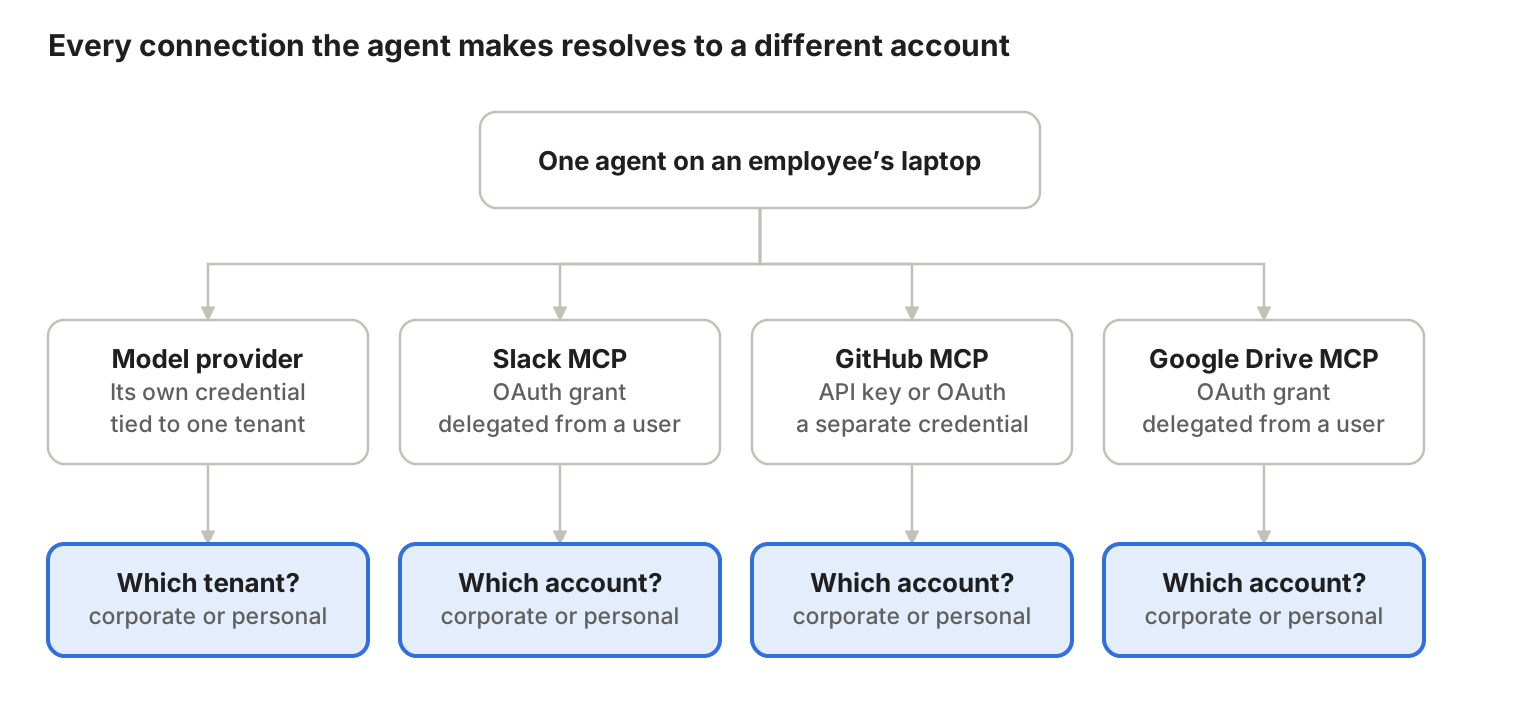
Each edge carries its own credential, and each credential resolves to an account that may or may not belong to your company.
So "what identity does this agent have?" has no single answer. The agent has one identity per connection: a different one for Google Drive, for Slack, for GitHub, and for the model provider.
Most MCP connections are authorized through OAuth, and that detail changes the picture more than people appreciate. An OAuth grant isn't an identity the agent owns. It's a delegation of a user's identity, with the scopes that user approved (often without reading them) and a lifetime that can outlast the agent's usefulness.
So the agent reaching into Google Drive is really the employee reaching into Google Drive, with the employee's permissions, through a token the employee minted in thirty seconds. Whatever the employee can see, the agent can see. And whichever account the employee was signed into when they clicked Allow is the account on the other side of that grant.
That last detail is where most of the exposure hides.
Every authenticated connection has an account on the far end, and nothing in an OAuth flow forces that account to be a corporate one. An employee authorizing Google Drive from an agent gets the familiar account picker, and nothing stops them from choosing the Gmail account they've had since college instead of their company Workspace account. Same screen, same Allow button, very different consequences for your data.
The same split exists at the model layer. The agent could be authenticated to your corporate Anthropic tenant, with your enterprise agreement, data handling terms, and admin controls. Or it could be authenticated to the employee's personal account, with none of that.
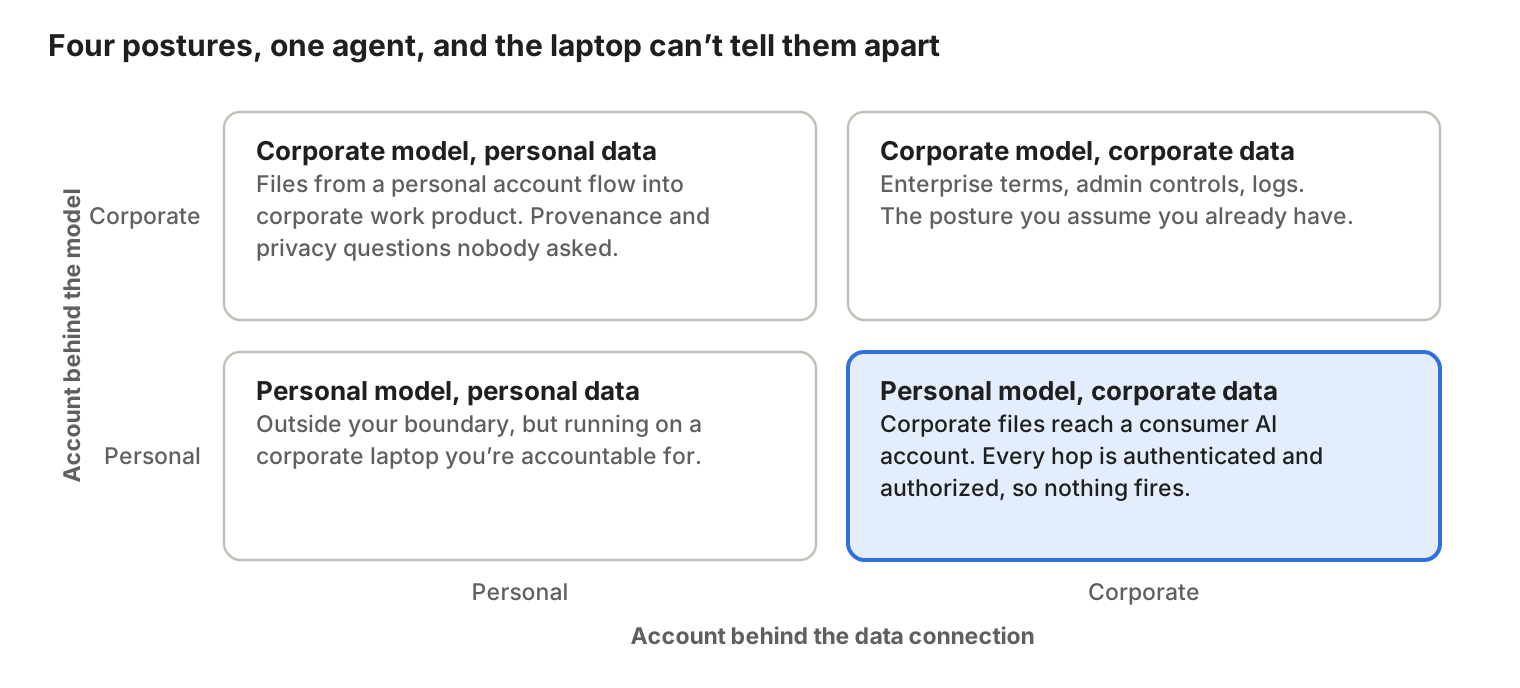
Each quadrant is a different security posture. From the laptop, all four look like the same agent.
The combinations compound. A corporate model tenant pulling from a personal data store is a provenance problem. A personal model account connected to corporate data stores is an exfiltration path that may trip no DLP rule, because every hop is authenticated and every hop was authorized by a legitimate user. Mapping these identities is how you find out whether your data stays inside your boundary or only appears to.
The natural instinct is to go find the agents, and endpoint telemetry is the obvious tool. It will tell you the AI client is installed, that a process is running, and (if you parse the config) which MCP servers it's wired to. That's a real answer to a real question. It's also where the visibility stops.
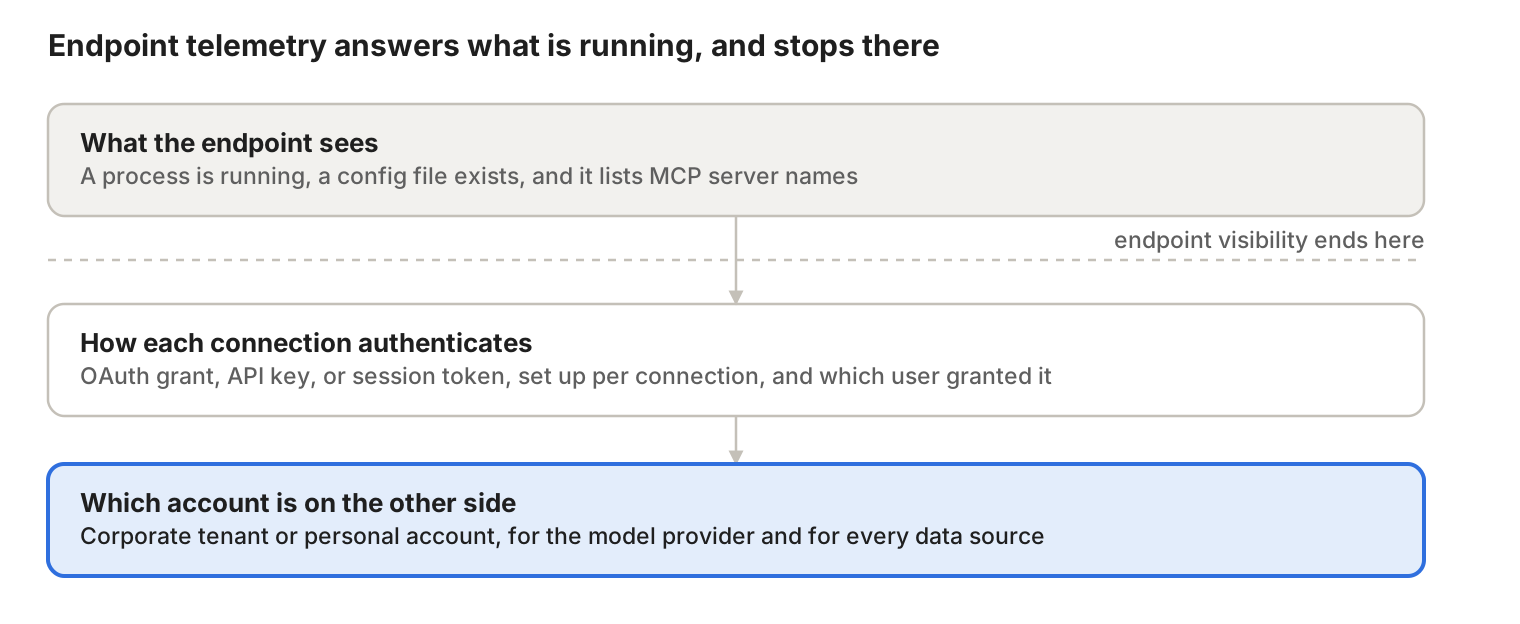
Endpoint telemetry answers what is running. It can't answer as whom, and as whom is what determines what the agent can touch.
The config file lists a Google Drive MCP server. It doesn't say whether that connection was authorized through OAuth or an API key, which user granted it, what scopes they approved, or whether the account on the far side is corporate or personal. Those facts live in the SaaS application's OAuth grant records, your identity provider, and the model provider's tenant. None of them live on the laptop.
A useful inventory of an agent looks like a graph. For each agent, you need:
With that map, the questions you care about become answerable. Which agents can reach corporate data through a personal model account? Which employees have delegated their Google Drive access to an agent? Which grants are still live for agents nobody runs anymore?
The reductive version of this conversation is attractive because it's tractable. Find the agents, assign them identities, done. The real version is harder because the identities were never assigned. They were accumulated, one Allow button at a time, by people trying to get work done.
The agent on the laptop is the least interesting thing to discover. The accounts behind each of its connections are where the exposure lives. Map those and you've secured the agent. Skip them and you've inventoried a process name.
That's the problem we're working on at Nudge Security: tracing every OAuth grant and non-human identity back to the account it actually resolves to.