Subscribe to all Changelog posts via RSS to stay updated on everything we ship at Nudge Security.
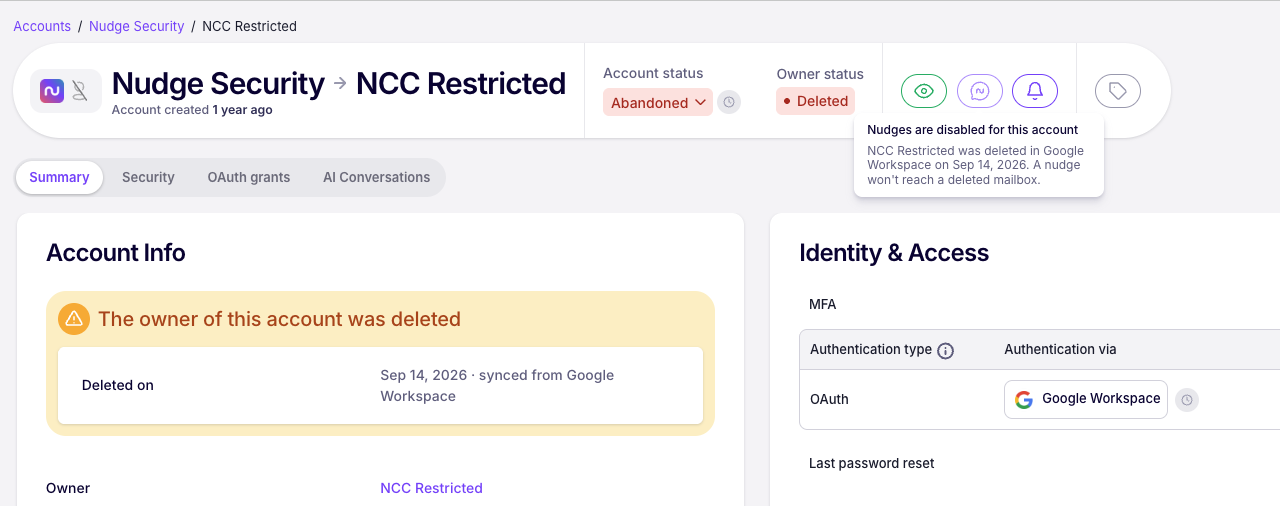
You can no longer send nudges to deleted, archived, or suspended users and accounts. The nudge button is disabled with a message explaining why the nudge can't be delivered.
When sending bulk nudges, we'll also tell you when some were skipped.
Nudge Security now discovers AI agents your team builds on Notion.
Every agent flows into your AI agents inventory under Identities, where you'll see its creator, components, risk insights, and more.
This is available as part of the AI agent discovery research preview. To get started, enable the Notion AI agents connected app in Nudge Security.
Not yet in the research preview? Request access from the AI Agents tab under Identities, or start a 14-day free trial if you're new to Nudge Security.
You can now set custom SSO domains. When the browser extension sees a login through one of them, Nudge Security fills in the SSO provider for that app, even without your identity provider's connected app. That way, you can filter your app inventory to see which apps use SSO. You can also auto-approve apps people sign into through those domains.
Head to Settings > Browser extension to add your custom SSO domains.
New to Nudge Security? Start a 14-day free trial to see and secure everything running across your SaaS estate.
Now generally available, Nudge Security’s adaptive risk management capabilities help security teams stay on top of evolving SaaS and third-party AI risks and respond dynamically as vendor security, access, integrations, data use, and other conditions change.
Head to Dashboards > Risk to get started. Learn more in our blog and press release.
New to Nudge Security? Start a 14-day free trial.
Nudge Security's AI agents are now live, so you can tackle sprawling OAuth and browser extension risk at scale. The AI agents analyze risk as it appears, explain each verdict in plain language, and carry out the actions your team authorizes.
Head to Automations > AI Agents to get started. Read our blog to learn more.
New to Nudge Security? Start a 14-day free trial.
You can now nudge employees to move their credentials into an approved password manager, in bulk.
Filter your accounts inventory by the password manager observed at login, including everything not set as approved, then multi-select and send the "Use approved password manager" nudge. Each account holder gets one batched nudge listing all of their accounts, not one nudge per account.
Head to your accounts inventory and filter by password manager to get started.
New to Nudge Security? Start a 14-day free trial to gain visibility and control over your SaaS estate.
Nudge Security now warns employees when they land on an OAuth device code authorization page and reminds them never to enter a code someone else gave them.
The nudge appears on every visit, across device code pages for Microsoft, Google, GitHub, GitLab, Salesforce, AWS, Docker, Zoom, Vercel, and OpenAI. Every acknowledgment is recorded as a nudge response.
Configure detection and turn on the nudge in your Browser Extension Settings.
New to Nudge Security? Start a 14-day free trial to see and secure everything running across your SaaS estate.
You can now deploy the Nudge Security browser extension on Safari, extending coverage to the default browser on every company Mac. Dedicated deployment support is available directly in the product, including silent rollout through Apple Business Manager and the MDM you already run, so there’s nothing for employees to install or turn on.
Deploy today using the step-by-step instructions in your Nudge Security settings.
Here’s a quick look at what the extension brings to your SaaS and AI security:
Reference the deployment guide for Safari support details and MDM prerequisites.
New to Nudge Security? Start a 14-day free trial to expand your SaaS and AI security coverage.
Nudge Security now discovers AI agents your team builds on Datadog and HubSpot, right from the browser.
Every agent flows into your AI agents inventory under Identities, where you'll see its creator, components, risk insights, and more.
This is available as part of the AI agent discovery research preview. Ensure you have browser-based agent discovery turned on in your browser extension settings.
Not yet in the research preview? Request access from the AI Agents tab under Identities, or start a 14-day free trial if you're new to Nudge Security.
See your organization's risk posture at a glance with our new risk dashboard, built automatically from the business criticality tiers and residual risk scores Nudge Security calculates for every app in your inventory. Nudge continuously monitors risk across your environment, so both those scores and your dashboard stay current as things change.
With it you can:
Head to Dashboards > Risk to explore the dashboard.
New to Nudge Security? Start a 14-day free trial to see your SaaS risk posture at a glance.